|
<LOGIN> October 20, 2026, 4:00 pm |

 |
Live Freeway Road Signs |
Rita Comes to Town |

|
|
Time/Distance/Speed
The TDS report will provide the user with a current live status report of the freeway congestion. The live
list will display a matrix format of the current speed and estimated time travel on a selected freeway and selected
starting intersection.
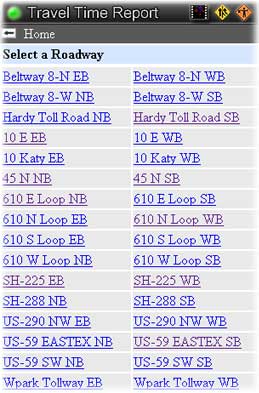
After selecting option-5 from the main menu you will be presented with a roadway to choose from for the "Travel Time Report"
In this example we will select roadway I-45 North NB. We will then be given the option to select a starting
intersection on the freeway IH-45 North going North Bound, NB.
|
|
|
|
From Location
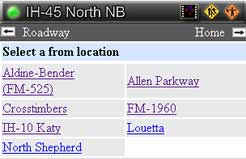
After selecting a roadway in the above example we must now select a starting/from intersection on the freeway.
This starting point will be the start position to determine the time, distance and speed for each intersection we encounter.
In this example we will selet a starting point for calculation at intersection IH-10 Katy.
|
|
|
|
TDS Status Report
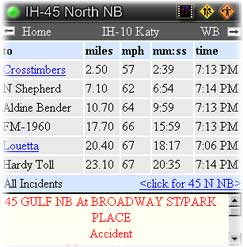
The final report will display a matrix style chart showing time, distance and speed to each intersection. The bottom
report will display the current road incident for all freeways.
Here we can see there is an accident at 45 Gulf North Bound
and Broadway St/Park Place. Paging down will reveal the nature and number of cars involved in the accident.
If there is a cam available the user may click on the "to location" to display the current cam.
In this example Crosstimbers and Louetta have available cams for immediate display.
|
|
|
|
Live Freeway Road Signs |
Rita Comes to Town |
|
|
|
|
Copyright © 1996 - 2013 JM Solutions, Inc. Houston, TX - All rights reserved.
Website Design JM Solutions Webmaster
|
